How to Configure Source NAT for Self-Originated Traffic in Sophos XG
Also available in: Read in Español
Self-originated traffic is traffic generated by the firewall itself, such as DNS lookups or access to Sophos update servers.
Administrators can NAT traffic generated by the firewall so that it exits with a specific IP address toward a designated destination.
This is very useful when the WAN interface is routed over an interconnection network and the public IP pool is configured as an alias.
How to translate the traffic
-
Open the firewall command line.
-
Go to Option 4. Device Console and run the following command:
set advanced-firewall sys-traffic-nat add destination <destination IP address> netmask <mask> snatip <SNAT address> interface <interface>
Example:
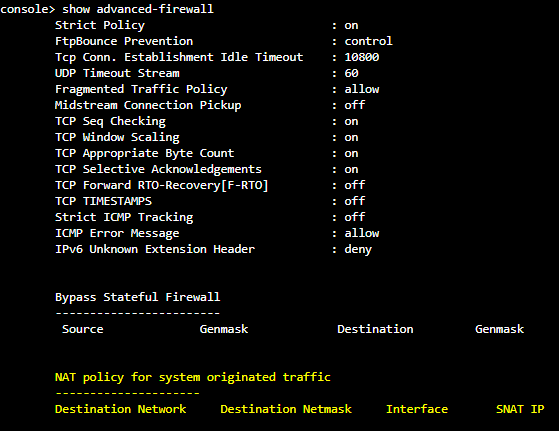
The NAT rule can be viewed by running the command:
show advanced-firewall
How to Configure Source NAT for Self-Originated Traffic in Sophos XG