How to Load Balance Traffic Across Multiple Links on Palo Alto Firewalls (ECMP)
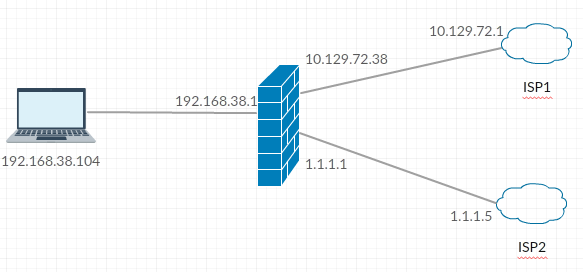
Equal-Cost Multipath supports routes with the “same cost” going to the same destination. Up to 4 equal-cost routes can be configured.
Without ECMP, if multiple routes with the same cost exist to the same destination, the virtual router selects one from the routing table and adds it to the forwarding table; it will not use any of the other routes unless the chosen route goes down.
ECMP load balancing is performed at the session level, not at the packet level. The equal-cost path is chosen when a new session is initiated on the firewall.
CONFIGURING ECMP
Let’s take the diagram above as an example, where we have the following interfaces configured:

Note: The ISP interfaces in this example are in different zones, but ECMP can be configured for interfaces in the same zone as well.
1. Configure the “Equal-Cost” routes
Open the virtual router in use and modify the ISP static routes so that they have the same metric:

2. Configure NAT policies
Verify that NAT policies are configured for each provider with their respective source translation.

Note: If the providers are in the same zone, you must create a NAT policy for each one and its respective destination interface.
3. Configure security policies
We must verify that the security policy applies to the correct zones; in this case we must add both zones from each provider.

4. Enable ECMP on the firewall
Now we must enable ECMP on the virtual router by going to Router Settings > ECMP. Click Enable, and in Max Path enter the number of ECMP links or routes (max 4).
Click Enable Symmetric Return if we want response packets to exit through the same interface that received the request.
Finally, choose a load balancing method:
- IP Modulo or IP Hash: Promote session stickiness, meaning they will try to keep sessions on the same interface based on source and destination.
- Balanced Round Robin: Distributes sessions evenly, favoring traffic balancing over stickiness.
- Weighted Round Robin: Similar to Round Robin, but allows assigning weights to each link in case they have different bandwidths. For example: Assign a weight of 100 to link A with 100 Mbps and assign a weight of 60 to link B with 60 Mbps. This helps avoid overloading a link when they do not have the same capacity.