Update All Dependencies of a NodeJS Project to Their Latest Version
How can you update all npm dependencies in the package.json file to their latest available version?
When you install a package using npm install <packagename>, the latest version of the package is downloaded and stored in the node_modules folder, and a corresponding entry is added to the package.json and package-lock.json files present in the current directory.
NPM resolves the dependencies and installs the latest available versions of those as well.
As an example, let’s install mongoose with npm install mongoose. This entry is added to the package.json file:
{
  "dependencies": {
    "mongoose": "^5.8.9"
  }
}
Additionally, the package-lock.json file is updated with the respective dependencies (nested dependencies removed for clarity):
{
  "requires": true,
  "lockfileVersion": 1,
  "dependencies": {
    "mongoose": {
      "version": "5.8.9",
      "resolved": "https://registry.npmjs.org/mongoose/-/mongoose-5.8.9.tgz",
      "integrity": "sha512-gRazoLTQ0yuv4bk2z+nZEarKCyJ7WilFBkgrRqpOczUZUhk3i/FCe0rp8Mjc87dGXaHx54j8AjPJ0UKqJDXWMA==",
      "requires": {
        "bson": "~1.1.1",
        "kareem": "2.3.1",
        "mongodb": "3.4.1",
        "mongoose-legacy-pluralize": "1.0.2",
        "mpath": "0.6.0",
        "mquery": "3.2.2",
        "ms": "2.1.2",
        "regexp-clone": "1.0.0",
        "safe-buffer": "5.1.2",
        "sift": "7.0.1",
        "sliced": "1.0.1"
      },
      "dependecies": {
        ...
      }
    }
  }
}
Now these two files tell us that we have installed version 5.8.9 of mongoose, and the update rule is ^5.8.9, which according to npm’s semantic versioning rules means that only patches and minor versions can be updated: 5.9.0, 5.9.1, and so on.
However, this does not apply to major versions that may break compatibility—for this example, 6.0.0 or higher.
If there is a minor or patch update and we run npm update, the installed version is updated, and the package-lock.json file will also be updated with the new version.
The package.json file remains unchanged.
To discover new major versions, we run npm outdated. The command will display the list of outdated packages as seen in this example:
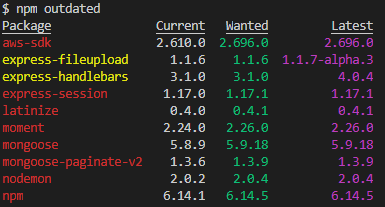
If the latest version is a major version, running npm update will not update to this version. Major versions are never updated this way because (by definition) they introduce breaking changes, and npm wants to avoid this.
To update all packages to a major version, install the npm-check-updates package globally:
npm install -g npm-check-updatesthen run it:
ncu -uThis will update all dependencies to their latest major version in the package.json file, so you can install them.
Now run the update:
npm update